Selfhosted Tools (Almost) Nobody Knows About
Over the past few years I’ve written the occasional post about my top 10 apps for my homelab . This time I wanted to write a slightly different post. After all, the top 10 always end up looking pretty similar, especially once you look at what other homelab folks are posting. So I figured I’d introduce you to a few tools that not everyone has running on their home network. Maybe it’s some inspiration for you.
AutoKuma
Almost everyone knows Uptime Kuma. What I don’t like is having to configure everything by clicking through the UI, especially when the work is basically repetitive. With AutoKuma (external link) you can configure Uptime Kuma directly via Docker labels. That eliminates the extra configuration step after starting the app. This is especially handy if, like me, you run GitOps : the availability monitoring gets set up right along with the deployment of the application. Naturally all the usual Uptime Kuma monitor types work here too.
    labels:
      - "kuma.strava.http.name='Strava Statistics'"
      - "kuma.strava.http.url=https://strava.casalani.de"
      - "kuma.strava.http.parent_name=apps"
      - "kuma.strava.http.max_retries=5"
That’s a small example from Strava Statistics. In the end it’s easy to carry over to other systems with a simple copy & paste.
AutoKuma itself is of course just a Docker container, so it can easily be started alongside everything else on any host.
services:
  autokuma:
    image: ghcr.io/bigboot/autokuma:2.0.0
    restart: unless-stopped
    environment:
      AUTOKUMA__KUMA__URL: https://uptimekuma.example.com
      AUTOKUMA__KUMA__USERNAME: kumaadmin
      AUTOKUMA__KUMA__PASSWORD: STRENGGEHEIMHESPASSWORD
    volumes:
      - /var/run/docker.sock:/var/run/docker.sock
      - ./autokuma:/data
    labels:
      - "kuma.apps.group.name=Applications"
And really, that’s about all there is to it.
Patchmon
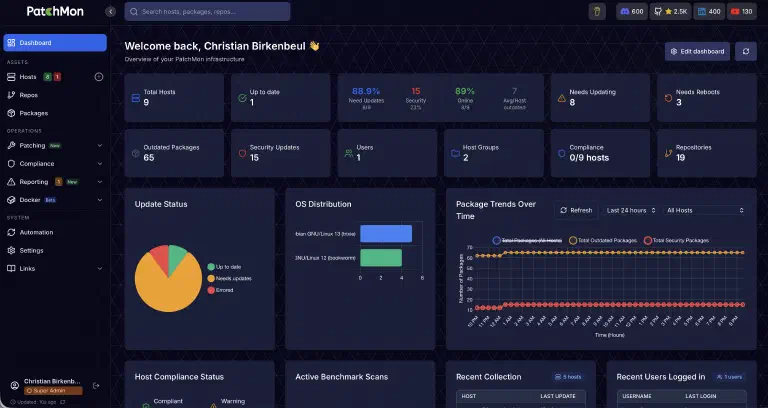
I discovered Patchmon (external link) a while ago. This still fairly young piece of software can handle patch management for your Linux and Windows systems. On top of that, a small vulnerability scanner can show you various hardening measures directly – though implementing them is of course up to you.
The Docker Compose stack for Patchmon is a bit bigger, since it consists of the app, a database, Redis, and Guacamole. The compose file provided by the vendor works really well though; I took it, including the accompanying .env file, pretty much as-is and barely had to adjust anything.
AdGuardHome-Sync
For a while I ran several physical servers, each with its own AdGuard Home instance . These days only one Proxmox host is left, but several AdGuard instances are still running on it.
Here too, I don’t want to make every change manually, and definitely not twice. At some point I noticed that I’d added a new filter list to one instance, and only days later, while debugging a completely unrelated problem, realized the second instance had never picked it up. That’s exactly the kind of forgetting AdGuardHome-Sync (external link) solves. If I change the blocklists or other settings on one host, they’re synced over to the second host shortly after.
The whole thing is configured through a single YAML file with an origin and replica definition:
cron: "*/10 * * * *"
origin:
  url: https://adguard-1.example.com
  username: admin
  password: STRENGGEHEIMESPASSWORD
replicas:
  - url: https://adguard-2.example.com
    username: admin
    password: STRENGGEHEIMESPASSWORD
    autoSetup: true
The autoSetup parameter is particularly handy: if a brand-new AdGuard Home instance joins the mix, the replica gets set up automatically on the first sync, instead of me having to click through the setup wizard by hand.
OpenCloud
OpenCloud (external link) is my (theoretically) leaner alternative to Nextcloud . I ran the latter for many months using the all-in-one container setup. It was definitely stable – unlike a lot of other people, I couldn’t really complain about it. But at some point, running a whole extra VM with the big Nextcloud stack just to manage a handful of files I want to access from outside my network started to feel like overkill.
A while ago OpenCloud kept coming up more and more in various communities, and I figured I’d give it a shot. It needs noticeably fewer resources, but in exchange the basic setup is quite a bit more complicated, especially if, like me, you want to manage a lot through Single Sign-On. Setting the whole thing up with Authentik is already a bit more involved, which is why I might write a separate post about that at some point.
Meerkat
Some of you have probably run into Monica as a CRM at some point. Unfortunately, development seems to have stalled, and its successor Chandler seems to have met the same fate. By contrast, Meerkat (external link) feels pleasantly lean and actively maintained: it ships as a single container instead of a big stack, which lowers the bar quite a bit for actually keeping it alive long-term.
Meerkat is a system that lets you manage your family, friends, acquaintances, coworkers, and everyone else as contacts. And not just addresses or phone numbers, but relationships, all kinds of anniversaries, and above all personal information about each person. I’ve for example noted down that my brother-in-law can’t eat peanuts, because there’s no way I’d remember that on my own by the next barbecue. For people like me, who struggle to keep track of a lot of information, it’s a fantastic system. As long as you actually keep it up to date…
Through the optional CardDAV server you can even sync the contacts to your phone. That turns Meerkat from just a digital notepad into something that can genuinely replace your address book.
SparkyFitness
Apps for tracking calorie burn, activities, and the like are a dime a dozen. Unfortunately most of them cost a fair bit of money these days. If you’re chasing a very ambitious fitness goal, those apps might be exactly right for you. For me, someone who just wants a bit of an overview, that’s an expense I don’t really need.
Luckily I came across SparkyFitness (external link) a while back. The developer describes the app as a selfhosted MyFitnessPal alternative, and I’d agree with that. The app can really do a lot. The downside is that onboarding, or rather the first few steps, are fairly tricky. You really have to sit down and carefully enter the foods you eat.
AdventureLog
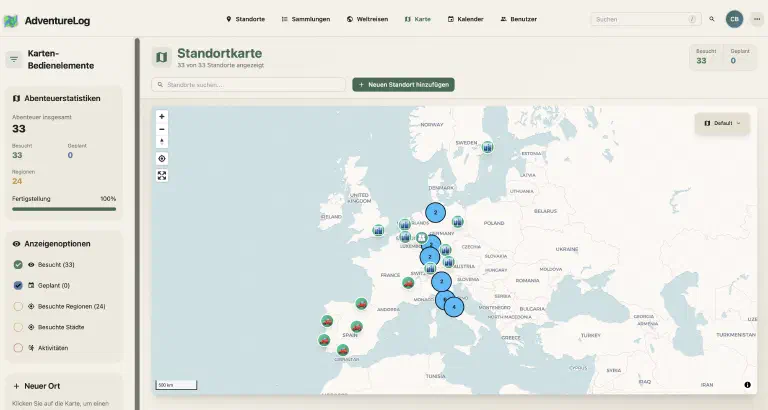
With AdventureLog (external link) you can either plan your trips or just track them. I only use it for the latter. In AdventureLog I’ve logged all the trips I’ve taken with my partner.
One really nice feature in AdventureLog is how your trips are displayed on a map. I printed it out and hung it on a wall in our living room together with various vacation photos, so guests can guess which photo belongs to which point on the map.
Conclusion
Seven tools that hopefully aren’t already on every other homelab top-10 list – from monitoring to patch management to a digital address book. Some of them I’m confident are here to stay (AutoKuma and AdGuardHome-Sync have been running quietly in the background for months), while with others like OpenCloud or SparkyFitness I’m still trying things out myself.
What almost all of them have in common: they solve one specific problem really well, instead of trying to be a giant all-in-one solution. Those are exactly the kind of tools that tend to get lost in the usual top-10 lists – even though they’re often the ones you end up appreciating most in everyday use.
Is there something running on your own network that hardly anyone talks about? Feel free to let me know – it might just turn into a second part of this list.